Knife-SoloからKnife-Zeroへの移行 #getchef
この記事は1年以上前に投稿されました。情報が古い可能性がありますので、ご注意ください。
はじめに
前回はChef-SoloとChef-Clientローカルモードを比較し、ローカルホストの収束を行いました。今回はリモートホストを管理するためのKnife-SoloとKnife-Zeroを比較してみます。
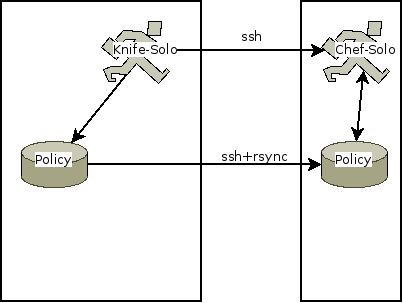
Knife-Soloでは次図のように、ローカルファイルシステム上にあるCookbookやAttributeなどのポリシーをssh+rsyncでリモートホストに転送し、sshでリモートホストにログインしてChef-Soloを実行してポリシーを参照して収束を行います。

Knife-Zeroでは次図のように、ローカルホスト上にあるポリシーやNode Objectを参照するためのChef-Zeroを起動し、sshでリモートホストにログインすると同時にTCPポートフォワーディングを設定し、ローカルホストのChef-Zeroにあるポリシーを参照して収束を行います。
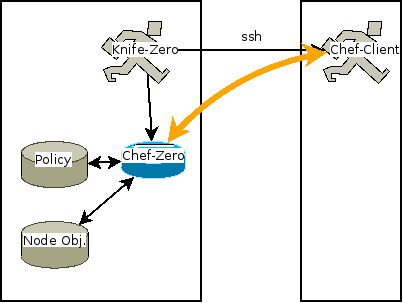
大変簡単に言うと、Knife-ZeroはChef-Clientローカルモードを活用することで、個別にChef-Serverを立てずともあたかもChef-Serverが存在するかのようにクライアント・サーバ的に動作を行って、リモートホストの収束を行うものです。
では、Knife-Zeroの例をいくつか見ていきましょう。
下準備
ワークステーション(ws.example.jp)として利用するUbuntu 12.04 LTSにChef DK 0.3.2をインストールしたものと、収束対象のリモートホスト(node.example.jp)として利用するUbuntu 12.04 LTSの2台を用意します。
ubuntu@ws:~$ sudo dpkg -i chefdk_0.3.2-1_amd64.deb
以前に未選択のパッケージ chefdk を選択しています。
(データベースを読み込んでいます ... 現在 49086 個のファイルとディレクトリがインストールされています。)
(chefdk_0.3.2-1_amd64.deb から) chefdk を展開しています...
chefdk (0.3.2-1) を設定しています ...
Thank you for installing Chef Development Kit!
ubuntu@ws:~$
ワークステーションでパスフレーズなしのSSH鍵ペアを作成し、公開鍵をあらかじめリモートホストに渡しておきます。
ubuntu@ws:~$ ssh-keygen -N ''
Generating public/private rsa key pair.
Enter file in which to save the key (/home/ubuntu/.ssh/id_rsa):
Created directory '/home/ubuntu/.ssh'.
Your identification has been saved in /home/ubuntu/.ssh/id_rsa.
Your public key has been saved in /home/ubuntu/.ssh/id_rsa.pub.
The key fingerprint is:
2e:51:77:b0:2e:6b:bd:14:a9:a6:cc:ef:65:27:82:53 ubuntu@ws.example.jp
The key's randomart image is:
+--[ RSA 2048]----+
|          .      |
|           o     |
|        . o .    |
|       . o o     |
|      . E +      |
|       = = .     |
|      + B * .    |
|     o * = +     |
|      +oo .      |
+-----------------+
ubuntu@ws:~$
ubuntu@node:~$ mkdir .ssh
ubuntu@node:~$ cat > .ssh/authorized_keys
ssh-rsa (省略) ubuntu@ws.example.jp
ubuntu@node:~$
リモートホストのログインユーザ「ubuntu」はパスワードなしで「sudo」コマンドが実行できるようになっている必要があります。
ワークステーションにて「chef generate repo」コマンドでchef-repoを作成し、以降の作業ディレクトリとします。
ubuntu@ws:~$ chef generate repo chef-repo
Compiling Cookbooks...
Recipe: code_generator::repo
* directory[/home/ubuntu/chef-repo] action create
- create new directory /home/ubuntu/chef-repo
:
:
:
(diff output suppressed by config)
ubuntu@ws:~$

ubuntu@ws:~$ tree -a chef-repo
chef-repo
├── .gitignore
├── LICENSE
├── README.md
├── Rakefile
├── certificates
│ └── README.md
├── chefignore
├── config
│ └── rake.rb
├── cookbooks
│ └── README.md
├── data_bags
│ └── README.md
├── environments
│ └── README.md
└── roles
└── README.md

6 directories, 11 files
ubuntu@ws:~$
chef-repoはgit管理下に置いておきましょう。手順は特に記載しません。Chef Starter Kitの活用を参照してください。
ntp Cookbookを例として用います。なお、以降「WARNING: No knife configuration file found」という警告が頻出しますが、.chef/knife.rbが存在していないためです。省略可能なので、今回は無視してください。
ubuntu@ws:~/chef-repo$ knife cookbook site install ntp -o cookbooks
WARNING: No knife configuration file found
Installing ntp to /home/ubuntu/chef-repo/cookbooks
Checking out the master branch.
Creating pristine copy branch chef-vendor-ntp
Downloading ntp from the cookbooks site at version 1.6.5 to /home/ubuntu/chef-repo/cookbooks/ntp.tar.gz
Cookbook saved: /home/ubuntu/chef-repo/cookbooks/ntp.tar.gz
Removing pre-existing version.
Uncompressing ntp version 1.6.5.
removing downloaded tarball
1 files updated, committing changes
Creating tag cookbook-site-imported-ntp-1.6.5
Checking out the master branch.
Updating 4878097..b23a1b8
Fast-forward
:
:
:
Cookbook ntp version 1.6.5 successfully installed
ubuntu@ws:~/chef-repo$
設定用のRoleを作っておきます。
ubuntu@ws:~/chef-repo$ vi roles/ntp.json
{
"json_class": "Chef::Role",
"name": "ntp",
"description": "ntp basic",
"default_attributes": {
"ntp": {
"servers": [
"0.ubuntu.pool.ntp.org",
"1.ubuntu.pool.ntp.org",
"2.ubuntu.pool.ntp.org",
"3.ubuntu.pool.ntp.org"
]
}
},
"run_list": [
"recipe[ntp]"
]
}
ubuntu@ws:~/chef-repo$
Knife-Soloの場合
Knife-Soloのインストール
「chef gem install」コマンドでKnife-Soloをインストールします。
ubuntu@ws:~/chef-repo$ chef gem install knife-solo
Fetching: knife-solo-0.4.2.gem (100%)
WARNING:  You don't have /home/ubuntu/.chefdk/gem/ruby/2.1.0/bin in your PATH,
gem executables will not run.
Thanks for installing knife-solo!

If you run into any issues please let us know at:
https://github.com/matschaffer/knife-solo/issues

If you are upgrading knife-solo please uninstall any old versions by
running `gem clean knife-solo` to avoid any errors.

See http://bit.ly/CHEF-3255 for more information on the knife bug
that causes this.
Successfully installed knife-solo-0.4.2
Parsing documentation for knife-solo-0.4.2
Installing ri documentation for knife-solo-0.4.2
Done installing documentation for knife-solo after 1 seconds
1 gem installed
ubuntu@ws:~/chef-repo$
リモートホストにChef-Soloをインストール
「knife solo prepare」コマンドで、指定のホストにChef-Client Omnibusパッケージをインストールします。
ubuntu@ws:~/chef-repo$ knife solo prepare node.example.jp
WARNING: No knife configuration file found
Bootstrapping Chef...
% Total    % Received % Xferd  Average Speed   Time    Time     Time  Current
Dload  Upload   Total   Spent    Left  Speed
100 16472  100 16472    0     0  14504      0  0:00:01  0:00:01 --:--:-- 18570
Downloading Chef 11.16.0 for ubuntu...
:
:
:
chef (11.16.0-1) を設定しています ...
Thank you for installing Chef!
Generating node config './nodes/node.example.jp.json'...
ubuntu@ws:~/chef-repo$
リモートホストにChef-Client Omnibusパッケージがインストールできました。同時に、ワークステーションの**nodes/**ディレクトリにノード設定用のJSONファイルが生成されました。
ubuntu@ws:~/chef-repo$ cat ./nodes/node.example.jp.json
{
"run_list": [

  ],
"automatic": {
"ipaddress": "node.example.jp"
}
}
ubuntu@ws:~/chef-repo$
リモートホストでChef-Soloを実行し収束を行う
ノード設定用のJSONファイルを編集し、run_listに先程作成したRoleを追加します。
ubuntu@ws:~/chef-repo$ vi nodes/node.example.jp.json
ubuntu@ws:~/chef-repo$ git diff
diff --git a/nodes/node.example.jp.json b/nodes/node.example.jp.json
index cf38459..575ca94 100644
--- a/nodes/node.example.jp.json
+++ b/nodes/node.example.jp.json
@@ -1,6 +1,6 @@
{
"run_list": [
-
+    "role[ntp]"
],
"automatic": {
"ipaddress": "node.example.jp"
ubuntu@ws:~/chef-repo$
「knife solo cook」コマンドで、指定のホストにchef-repoを転送し、指定のホストでchef-soloを実行します。
ubuntu@ws:~/chef-repo$ knife solo cook node.example.jp
WARNING: No knife configuration file found
Running Chef on node.example.jp...
Checking Chef version...
Uploading the kitchen...
Generating solo config...
Running Chef...
:
:
:
Starting Chef Client, version 11.16.0
Compiling Cookbooks...
Converging 9 resources
Recipe: ntp::default
* package[ntp] action install
- install version 1:4.2.6.p3+dfsg-1ubuntu3.1 of package ntp
* package[ntpdate] action install (up to date)
* directory[/var/lib/ntp] action create (up to date)
* directory[/var/log/ntpstats/] action create (up to date)
* cookbook_file[/etc/ntp.leapseconds] action create
- create new file /etc/ntp.leapseconds
- update content in file /etc/ntp.leapseconds from none to 274665
:
:
:
- change mode from '' to '0644'
- change owner from '' to 'root'
- change group from '' to 'root'
Recipe: ntp::apparmor
* service[apparmor] action nothing (skipped due to action :nothing)
* cookbook_file[/etc/apparmor.d/usr.sbin.ntpd] action create
- update content in file /etc/apparmor.d/usr.sbin.ntpd from a88a6b to fdf13c
:
:
:
Recipe: ntp::default
* template[/etc/ntp.conf] action create
- update content in file /etc/ntp.conf from 4eb9a0 to 64d24c
:
:
:
* service[ntp] action enable (up to date)
* service[ntp] action start (up to date)
Recipe: ntp::apparmor
* service[apparmor] action restart
- restart service service[apparmor]
Recipe: ntp::default
* service[ntp] action restart
- restart service service[ntp]

Running handlers:
Running handlers complete
Chef Client finished, 6/11 resources updated in 14.870581634 seconds
ubuntu@ws:~/chef-repo$
適用できたことを確認します。
ubuntu@ws:~/chef-repo$ ssh node.example.jp ps auxwwwf | grep '[ n]tp'
ntp       9914  0.0  0.0  37780  2192 ?        Ss   16:52   0:00 /usr/sbin/ntpd -p /var/run/ntpd.pid -g -u 106:113
ubuntu@ws:~/chef-repo$

ubuntu@ws:~/chef-repo$ ssh node.example.jp grep pool.ntp.org /etc/ntp.conf
server 0.ubuntu.pool.ntp.org iburst
restrict 0.ubuntu.pool.ntp.org nomodify notrap noquery
server 1.ubuntu.pool.ntp.org iburst
restrict 1.ubuntu.pool.ntp.org nomodify notrap noquery
server 2.ubuntu.pool.ntp.org iburst
restrict 2.ubuntu.pool.ntp.org nomodify notrap noquery
server 3.ubuntu.pool.ntp.org iburst
restrict 3.ubuntu.pool.ntp.org nomodify notrap noquery
ubuntu@ws:~/chef-repo$
無事に収束しました。
リモートホストに転送されたファイルを見てみましょう。
ubuntu@ws:~/chef-repo$ ssh node.example.jp tree -aF -L 2 chef-solo
chef-solo
├── cookbooks-1/
│   └── chef-solo-search/
├── cookbooks-2/
│   ├── README.md
│   └── ntp/
├── data_bags/
│   └── README.md
├── dna.json
├── environments/
│   └── README.md
├── nodes/
│   └── node.example.jp.json
├── roles/
│   ├── README.md
│   └── ntp.json
└── solo.rb

8 directories, 8 files
ubuntu@ws:~/chef-repo$
このように、Knife-Soloではchef-repoをリモートホストにrsyncで転送し、リモートホストでChef-Soloを実行するようになっています。
なお、もしリモートホストにrsyncがインストールされていない場合、chef-repoの転送に失敗します。
ubuntu@ws:~/chef-repo$ knife solo cook node.example.jp
WARNING: No knife configuration file found
Running Chef on node.example.jp...
Checking Chef version...
Uploading the kitchen...
bash: rsync: コマンドが見つかりません
rsync: connection unexpectedly closed (0 bytes received so far) [sender]
rsync error: error in rsync protocol data stream (code 12) at io.c(605) [sender=3.0.9]
ERROR: RuntimeError: Failed to launch command ["rsync", (後略)
Knife-Zeroの場合
下準備
Knife-Zeroで適用する前に、リモートホストにインストールしたntpパッケージとchefパッケージをアンインストールしておきます。残っていても問題ありませんが、Knife-Zeroの動作を見るためです。
ubuntu@ws:~/chef-repo$ ssh node.example.jp sudo apt-get purge ntp chef -y
パッケージリストを読み込んでいます...
依存関係ツリーを作成しています...
状態情報を読み取っています...
以下のパッケージが自動でインストールされましたが、もう必要とされていません:
libopts25 libcap2
これらを削除するには 'apt-get autoremove' を利用してください。
以下のパッケージは「削除」されます:
chef* ntp*
アップグレード: 0 個、新規インストール: 0 個、削除: 2 個、保留: 6 個。
この操作後に 111MB のディスク容量が解放されます。
(データベースを読み込んでいます ... 現在 61148 個のファイルとディレクトリがインストールされています。)
chef を削除しています ...
chef の設定ファイルを削除しています ...
ntp を削除しています ...
* Stopping NTP server ntpd
...done.
ntp の設定ファイルを削除しています ...
man-db のトリガを処理しています ...
ureadahead のトリガを処理しています ...
ubuntu@ws:~/chef-repo$
Knife-Soloの実行で生成されたノード設定用のJSONファイルを削除しておきます。
ubuntu@ws:~/chef-repo$ rm nodes/node.example.jp.json
ubuntu@ws:~/chef-repo$
Knife-Zeroのインストール
「chef gem install」コマンドでKnife-Zeroをインストールします。
ubuntu@ws:~/chef-repo$ chef gem install knife-zero
Fetching: knife-zero-1.0.0.gem (100%)
WARNING:  You don't have /home/ubuntu/.chefdk/gem/ruby/2.1.0/bin in your PATH,
gem executables will not run.
Successfully installed knife-zero-1.0.0
Parsing documentation for knife-zero-1.0.0
Installing ri documentation for knife-zero-1.0.0
Done installing documentation for knife-zero after 0 seconds
1 gem installed
ubuntu@ws:~/chef-repo$
リモートホストにChef-Clientをインストール
「knife zero bootstrap」コマンドで、指定のホストにChef-Client Omnibusパッケージをインストールします。「-x」オプションでログインユーザを指定し、「--sudo」オプションでsudoコマンドでroot権限を得ることを指定しています。
ubuntu@ws:~/chef-repo$ knife zero bootstrap node.example.jp -x ubuntu --sudo
WARNING: No knife configuration file found
Connecting to node.example.jp
node.example.jp Installing Chef Client...
:
:
:
node.example.jp chef (11.16.4-1) を設定しています ...
node.example.jp Thank you for installing Chef!
node.example.jp Starting first Chef Client run...
:
:
:
node.example.jp Starting Chef Client, version 11.16.4
node.example.jp Creating a new client identity for node.example.jp using the validator key.
node.example.jp resolving cookbooks for run list: []
node.example.jp Synchronizing Cookbooks:
node.example.jp Compiling Cookbooks...
node.example.jp [2014-11-11T17:43:21+09:00] WARN: Node node.example.jp has an empty run list.
node.example.jp Converging 0 resources
node.example.jp
node.example.jp Running handlers:
node.example.jp Running handlers complete
node.example.jp Chef Client finished, 0/0 resources updated in 1.116895026 seconds
ubuntu@ws:~/chef-repo$
リモートホストにChef-Client Omnibusパッケージがインストールできました。同時に、qワークステーションの**nodes/**ディレクトリに「Node Object」が生成されました。
ubuntu@ws:~/chef-repo$ ls -lF nodes/
合計 32
-rw-rw-r-- 1 ubuntu ubuntu 31250 11月 11 17:43 node.example.jp.json
ubuntu@ws:~/chef-repo$
ubuntu@ws:~/chef-repo$ view nodes/node.example.jp.json
{
"name": "node.example.jp",
"normal": {
"tags": [

]
},
"automatic": {
"network": {
"interfaces": {
"lo": {
"mtu": "16436",
"flags": [
"LOOPBACK",
"UP",
"LOWER_UP"
],
:
:
:
"recipes": [

],
"roles": [

    ]
}
}
ubuntu@ws:~/chef-repo$
これらのオブジェクトはローカルホストで実行されたChef-Zeroサーバによって生成されたものです。Knife-Zeroは、ローカルホストで実行したChef-Zeroサーバとリモートホストで実行したChef-Clientの間をSSHポートフォワーディングによって結びつけることで、この機能を実現しています。Knife-Soloと異なり、rsyncは必要ありません。
前回の記事「Chef-SoloからChef-Clientローカルモードへの移行」にあるように、これらのオブジェクトはknifeのサブコマンドに「-z (--local-mode)」オプションを付与して実行することで、閲覧・操作が可能です。
ubuntu@ws:~/chef-repo$ knife client list -z
WARNING: No knife configuration file found
node.example.jp
ubuntu@ws:~/chef-repo$

ubuntu@ws:~/chef-repo$ knife node list -z
WARNING: No knife configuration file found
node.example.jp
ubuntu@ws:~/chef-repo$
リモートホストでChef-Clientを実行し収束を行う
Knife-Soloで設定したファイルからの変化を見るために、Roleを編集しておきます。
ubuntu@ws:~/chef-repo$ vi roles/ntp.json
ubuntu@ws:~/chef-repo$ git diff
diff --git a/roles/ntp.json b/roles/ntp.json
index 045d224..adbc3bc 100644
--- a/roles/ntp.json
+++ b/roles/ntp.json
@@ -5,10 +5,10 @@
"default_attributes": {
"ntp": {
"servers": [
-        "0.ubuntu.pool.ntp.org",
-        "1.ubuntu.pool.ntp.org",
-        "2.ubuntu.pool.ntp.org",
-        "3.ubuntu.pool.ntp.org"
+        "0.asia.pool.ntp.org",
+        "1.asia.pool.ntp.org",
+        "2.asia.pool.ntp.org",
+        "3.asia.pool.ntp.org"
]
}
},
ubuntu@ws:~/chef-repo$
knifeコマンドのローカルモードで、run_listにRoleを追加します。
ubuntu@ws:~/chef-repo$ knife node run_list add node.example.jp 'role[ntp]' -z
WARNING: No knife configuration file found
node.example.jp:
run_list: role[ntp]
ubuntu@ws:~/chef-repo$
ubuntu@ws:~/chef-repo$ git diff nodes/node.example.jp.json
diff --git a/nodes/node.example.jp.json b/nodes/node.example.jp.json
index eb7f9b5..c3f0e8a 100644
--- a/nodes/node.example.jp.json
+++ b/nodes/node.example.jp.json
@@ -1321,5 +1321,8 @@
"roles": [

     ]
-  }
+  },
+  "run_list": [
+    "role[ntp]"
+  ]
}
ubuntu@ws:~/chef-repo$
Node Objectに相当するJSONファイルをエディタで直接編集しても構いません。
「knife zero converge」コマンドで、指定のホストでChef-Clientを実行して収束を行います。
ubuntu@ws:~/chef-repo$ knife zero converge 'name:node.example.jp' -x ubuntu --sudo
WARNING: No knife configuration file found
node.example.jp [2014-11-11T18:23:06+09:00] WARN:
:
:
:
node.example.jp Starting Chef Client, version 11.16.4
node.example.jp resolving cookbooks for run list: ["ntp"]
node.example.jp Synchronizing Cookbooks:
node.example.jp   - ntp
node.example.jp Compiling Cookbooks...
node.example.jp Converging 9 resources
node.example.jp Recipe: ntp::default
node.example.jp   * package[ntp] action install
node.example.jp     - install version 1:4.2.6.p3+dfsg-1ubuntu3.1 of package ntp
node.example.jp   * package[ntpdate] action install (up to date)
node.example.jp   * directory[/var/lib/ntp] action create (up to date)
node.example.jp   * directory[/var/log/ntpstats/] action create (up to date)
node.example.jp   * cookbook_file[/etc/ntp.leapseconds] action create (up to date)
node.example.jp Recipe: ntp::apparmor
node.example.jp   * service[apparmor] action nothing (skipped due to action :nothing)
node.example.jp   * cookbook_file[/etc/apparmor.d/usr.sbin.ntpd] action create
node.example.jp     - update content in file /etc/apparmor.d/usr.sbin.ntpd from a88a6b to fdf13c
:
:
:
node.example.jp Recipe: ntp::default
node.example.jp   * template[/etc/ntp.conf] action create
node.example.jp     - update content in file /etc/ntp.conf from 4eb9a0 to 565516
:
:
:
node.example.jp   * service[ntp] action enable (up to date)
node.example.jp   * service[ntp] action start (up to date)
node.example.jp Recipe: ntp::apparmor
node.example.jp   * service[apparmor] action restart
node.example.jp     - restart service service[apparmor]
node.example.jp Recipe: ntp::default
node.example.jp   * service[ntp] action restart
node.example.jp     - restart service service[ntp]
node.example.jp
node.example.jp Running handlers:
node.example.jp Running handlers complete
node.example.jp Chef Client finished, 5/11 resources updated in 10.573336982 seconds
ubuntu@ws:~/chef-repo$
適用できたことを確認します。
ubuntu@ws:~/chef-repo$ knife ssh 'name:node.example.jp' -z ps auxwwwf | grep '[ n]tp'
WARNING: No knife configuration file found
node.example.jp ntp      24654  0.0  0.0  37780  2180 ?        Ss   18:23   0:00 /usr/sbin/ntpd -p /var/run/ntpd.pid -g -u 106:113
ubuntu@ws:~/chef-repo$
ubuntu@ws:~/chef-repo$ knife ssh 'name:node.example.jp' -z grep pool.ntp.org /etc/ntp.conf
WARNING: No knife configuration file found
node.example.jp server 0.asia.pool.ntp.org iburst
node.example.jp restrict 0.asia.pool.ntp.org nomodify notrap noquery
node.example.jp server 1.asia.pool.ntp.org iburst
node.example.jp restrict 1.asia.pool.ntp.org nomodify notrap noquery
node.example.jp server 2.asia.pool.ntp.org iburst
node.example.jp restrict 2.asia.pool.ntp.org nomodify notrap noquery
node.example.jp server 3.asia.pool.ntp.org iburst
node.example.jp restrict 3.asia.pool.ntp.org nomodify notrap noquery
ubuntu@ws:~/chef-repo$
無事に収束しました。
chef-repoのNode Objectも更新されています。
ubuntu@ws:~/chef-repo$ git diff
diff --git a/nodes/node.example.jp.json b/nodes/node.example.jp.json
index eb7f9b5..2cdb327 100644
--- a/nodes/node.example.jp.json
+++ b/nodes/node.example.jp.json
@@ -5,6 +5,42 @@

     ]
},
+  "default": {
+    "ntp": {
+      "servers": [
+        "0.asia.pool.ntp.org",
+        "1.asia.pool.ntp.org",
+        "2.asia.pool.ntp.org",
+        "3.asia.pool.ntp.org"
+      ],
:
:
:
@@ -1316,10 +1365,15 @@
}
},
"recipes": [
-
+      "ntp",
+      "ntp::default",
+      "ntp::apparmor"
],
"roles": [
-
+      "ntp"
]
-  }
+  },
+  "run_list": [
+    "role[ntp]"
+  ]
}
ubuntu@ws:~/chef-repo$
このように、Chef-Zeroを活用してあたかもChef-Serverが存在するかのようにリモートホストで収束が行えました。knife zero convergeはSearch機能を用いており、複数ホストに対して直列・並列で収束させることもできます。
まとめ
Knife-SoloとKnife-Zeroの比較と移行、利用方法を簡単に紹介しました。Knife-Zeroは、Chef-Serverを用いずともChef社が推奨するクライアント・サーバモデルでChefを扱うことができます。実際のChef-Serverへの移行も比較的容易です。小規模ではKnife-ZeroやHosted版Enterprise Chefから始め、規模が大きくなるにつれてHosted版/オンプレミス版Enterprise Chefへ移行するというシナリオも考えられるでしょう。是非活用してみてください。
Author

はやりの技術要素に加えて、会議の進め方・文章の書き方などの業務改善にも取り組んでいます。「Chef活用ガイド」共著のほか、Debian Official Developerもやっています。